Some devices exude a premium feel as soon as you take them out of their packaging. The iPhone, MacBook, and now, in my review of the Backbone Pro, I will demonstrate that there’s a mobile gaming controller that provides a similarly luxurious impression.
While the Backbone Pro is portable, it remains comfy enough for extended gaming periods, featuring buttons that are both satisfying and responsive. However, spending $169.99 on a gaming accessory implies you anticipate more than the standard features. This is what Backbone asserts to provide—greater precision, enhanced comfort, and increased freedom. So, do they fulfill this promise? Backbone sent me their Pro controller for evaluation, and I’m here to assist you in determining if it justifies the cost for your gaming needs.
Recently, I watched ETA Prime review another high-end mobile gaming controller. To be frank, it didn’t exude a premium essence. However, with the Backbone Pro, the scenario is quite different from the outset. Quiet buttons, fluid movements, and as you continue using it, you begin to appreciate a pleasing harmony between the device’s hardware and software.
Design
Prior to my assessment of the Backbone Pro, I consulted Reddit for any pressing questions. Several users quickly responded, sharing their opinions that the Pro controller falls short for online gaming. One user remarked, “The analog sticks are too small, leading to larger dead zones. ” So, how does my personal experience with the controller compare?
After my own testing, I can confidently say there’s a remarkable difference when driving a vehicle in Call of Duty: Mobile on my iPhone versus using the Backbone Pro. Steering became effortless. Trees no longer unexpectedly obstructed my vehicle. Targeting opponents felt precise, and I frequently managed to take aim just before they did. So, what accounts for this advantage?
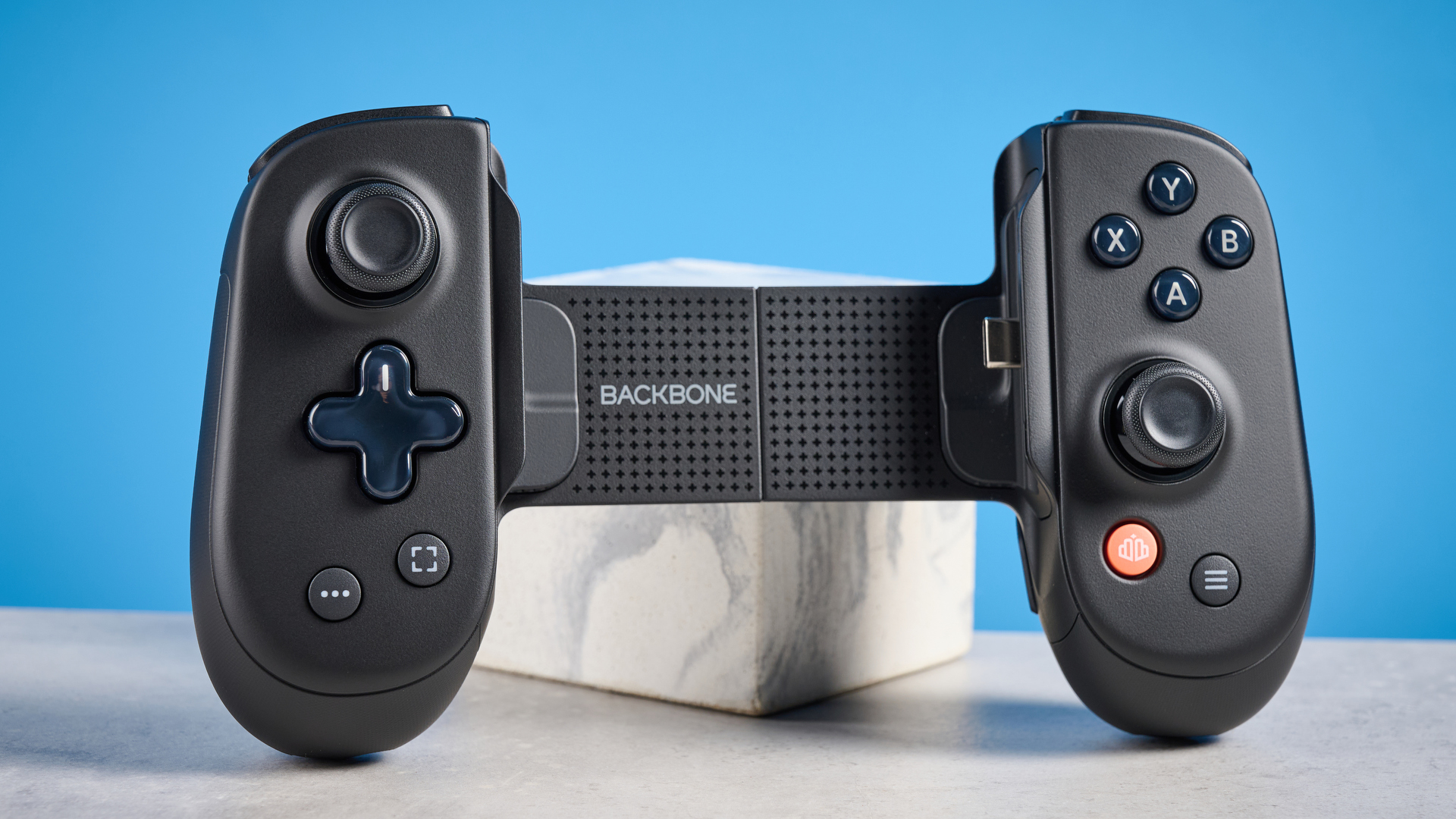
Backbone asserts that every component—from the meticulously designed full-size analog sticks to grips featuring laser-etched markings placed at 0.3 mm—resulted from tireless refinement of the entire design. Unlike other mobile controllers, my hands didn’t feel cramped, even after several hours of gameplay.
On the underside of the Backbone Pro, you will discover a USB-C port for passthrough charging on the right and a 3.5 mm headphone jack on the left. Adjacent to it is a pairing button for wireless connectivity with PCs, tablets, smart TVs, and more.
Features
The Backbone Pro caters to all your gaming requirements, encompassing PS Remote Play, Xbox Remote Play, Steam Link, and cloud gaming services like Xbox Game Pass Ultimate, GeForce Now, and Amazon Luna. It’s a versatile controller compatible with both your smartphone and computer, allowing you to carry just one controller during your travels.
The layout accommodates various devices (Android and iPhone series 15/16/17), and the provided adapters simplify using the Backbone Pro with the majority of smartphones. I tried it with my iPhone 15 Pro, including a Vodafone case from Tirana, and encountered no problems. Some users on Reddit inquired about the iPhone 17 Pro Max, so I investigated—turns out, it operates seamlessly.
Software
What distinguishes the Backbone Pro from other mobile gaming controllers is its integration of hardware and its accompanying app. The app enables you to develop personalized controller profiles, adjust the button configuration, and fine-tune the thumbstick and trigger areas. I appreciated how simple it was to evaluate various dead zones directly within the app. I ultimately created a few profiles that worked wonderfully for COD Mobile and NBA 2K Mobile.
The companion app allows for immediate access to your games, friends’ activities, and streaming options all in one location. By scrolling down a bit, you’ll discover clips that you’ve saved, along with those from your friends.
There is even a specific button designated for capturing screenshots or recording video during gameplay. You can also press the Backbone button to mark significant moments, and when recording, the button illuminates in red, so you’ll always be aware of when you’re streaming live.
Performance
The Backbone Pro excels in mobile gaming. Whether you’re tackling Call of Duty Mobile, PUBG, or Genshin Impact, it performs effortlessly without any delays. The buttons may not feel as clicky as those on the Backbone One, but they still provide a robust and responsive experience. Whether competing in shooters, sports games, or streaming from your console, it delivers that console-like experience while on the move.
I primarily focused on COD Mobile, and the difference is evident. Quick-scoping or engaging with the Type 67 feels just like using an actual console. After just a few rounds, I found it hard to revert to touch controls. The Backbone Pro enhances the game’s fluidity, clarity, and enjoyment. Plus, I’ve certainly enjoyed my share of MVP achievements.
When connected via a wired connection, battery life is not a concern. With Bluetooth, you can enjoy up to 40 hours of gameplay before needing a recharge.
Verdict
After using the Backbone Pro for several weeks, I can affirm that the elevated price is justifiable if you appreciate the additional features. For me, the combination of durable hardware, seamless controls, and the supportive app transformed my gaming experience. If you require only a basic controller, more affordable options like the GameSir G8 Galileo are adequate, but they lack the level of refinement found in the Backbone Pro. If you seek greater precision, comfort, and adaptability, I believe you will understand my perspective.